

Jebbie's Almanac
A leveling almanac that plans around you.
 Made for WoW Forever
The launcher is coming soon for your system. Until then, install the addons by hand: it takes a minute.
or install Jebbie's Almanac by hand · what the launcher does
Every system
- Mac (Apple Silicon and Intel): JebbiesMods-0.1.23-universal.dmg (9.3 MB, signed and notarized)
- Windows: JebbiesMods-0.1.23-x64-setup.exe (2.3 MB)
- Linux: launcher coming soon; install by hand

Routes that start where you stand
Open the Almanac and it reads your level, class, race and the quests you have done, then picks the route and the next step from there. No starting over at step one because you played a little on your own.
Trainers, flights and boats
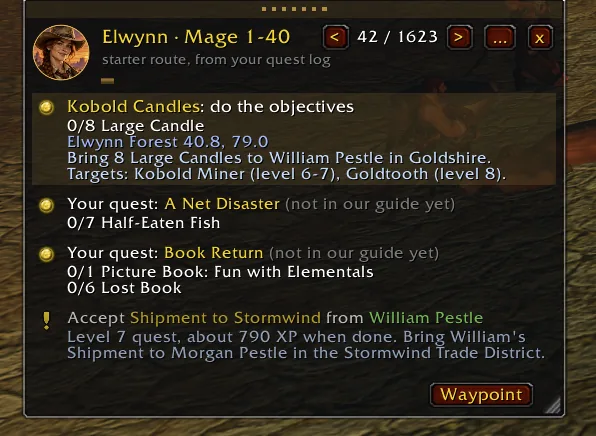
Trainer visits are in the route with the spells you get and what they cost. Flights, the tram, ships and zeppelins, and your hearthstone are planned for you, so the route knows when walking is the slow way.
Alliance and Horde
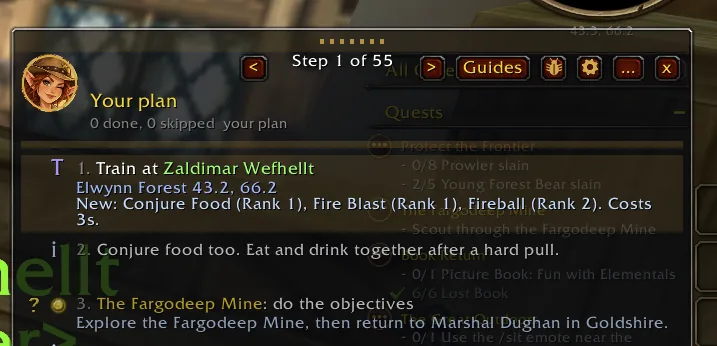
Every race and class has a route from 1 to 60, from Elwynn, Dun Morogh and Teldrassil to Durotar, Tirisfal Glades and Mulgore, with each class's own quests and tips. Shaman included, and the Dwarf Shamans and Undead Paladins that are new in Forever.
A plan that follows the game
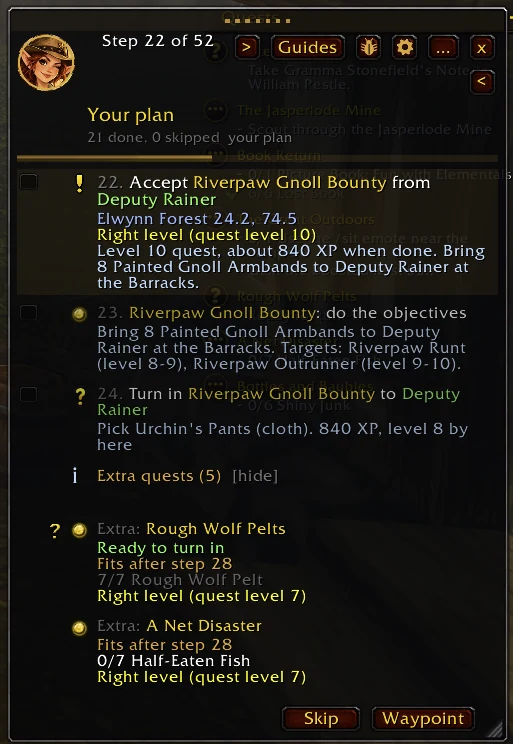
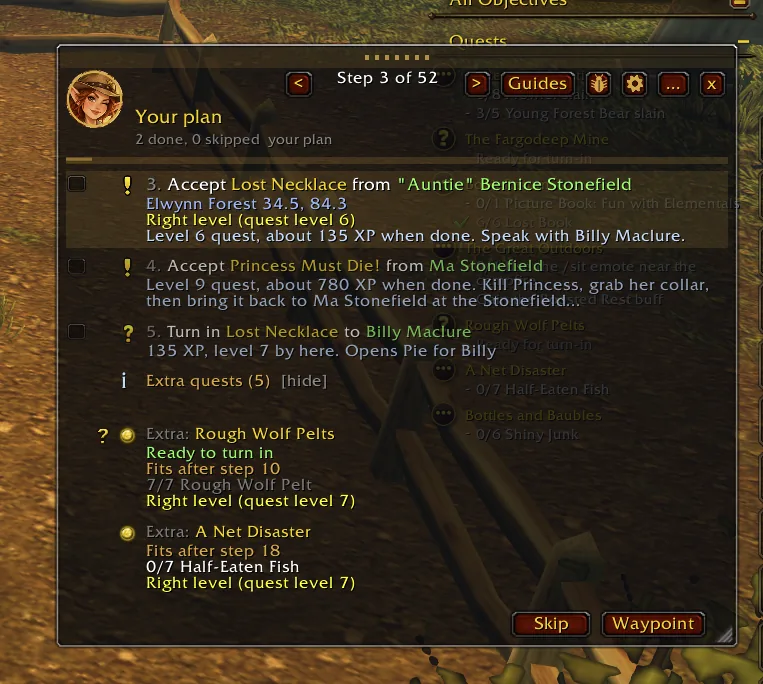
Each step shows done, in progress or skipped from what the game reports. Tick a step yourself, skip one and come back later, and see extra quests you picked up, with where they fit on your way.
New in the beta: stop cards
Turn on Beta in the launcher and your route is grouped into stops, the way you play it: where to go (click it to set the waypoint), who to talk to, and everything to do there, with live counts. Your current stop is highlighted and the next five stay in view. Compact shows one line per stop. The new guide window and the classic window both have them, and /jebbie view switches between the two.
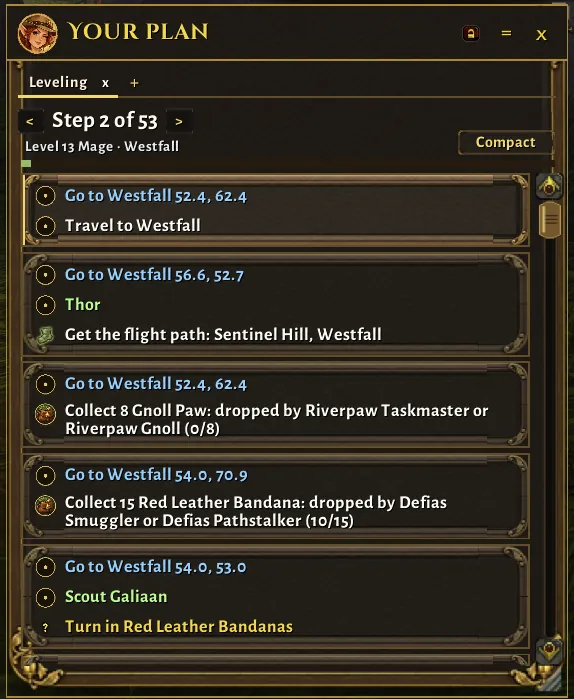
Stop cards in the beta.
Back in step with your quest log
In the beta, the route rebuilds itself when you log in and as you accept, finish, abandon or turn in quests, so it does not drift from what you are doing. /jebbie resync does it right now and tells you which step you are on.
Quests new in WoW Forever
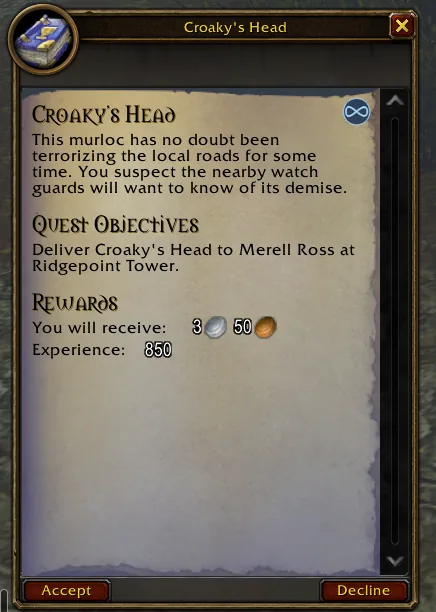
Quests that are new in WoW Forever stand out: a soft blue tint on the quest window, a small infinity badge in its corner, and a blue infinity mark after the title in your quest log. Turn it off with Mark new Forever quests in the settings.
Waypoint, arrow and map pins
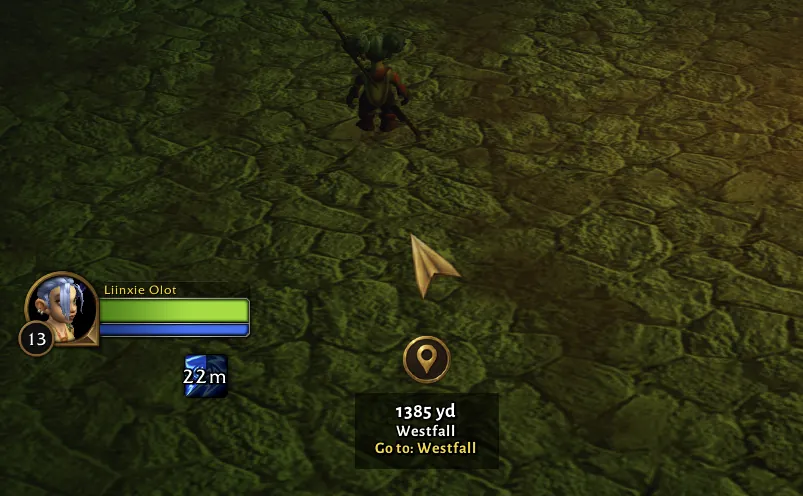
Every step sets the game's own waypoint, an on-screen arrow shows distance and time, and the next few steps are pinned on your world map. In the beta, the marker under the arrow follows the game's own signs: a yellow ? to turn in, ! to accept a quest, a flight icon for a flight path, with a short line saying what to do there.
Gold and professions
All twelve professions from 1 to 300 on the cheapest path, with materials counted from your bags, and what to vendor, auction or keep, from the Auction House prices you have seen yourself.
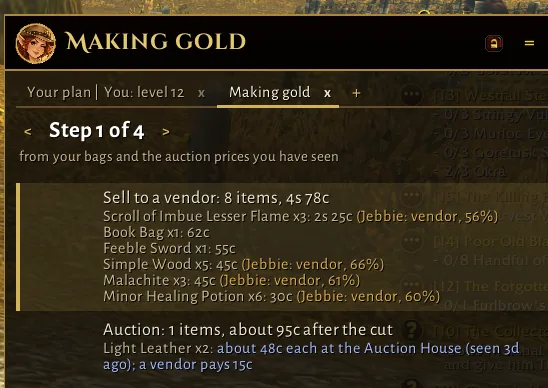
Making gold, in the beta (0.9.66).
Level brackets, one pack at a time
Routes come in level-bracket packs up to 60, and the Almanac loads only the pack for your class and level, so it stays light.
Everything in one menu
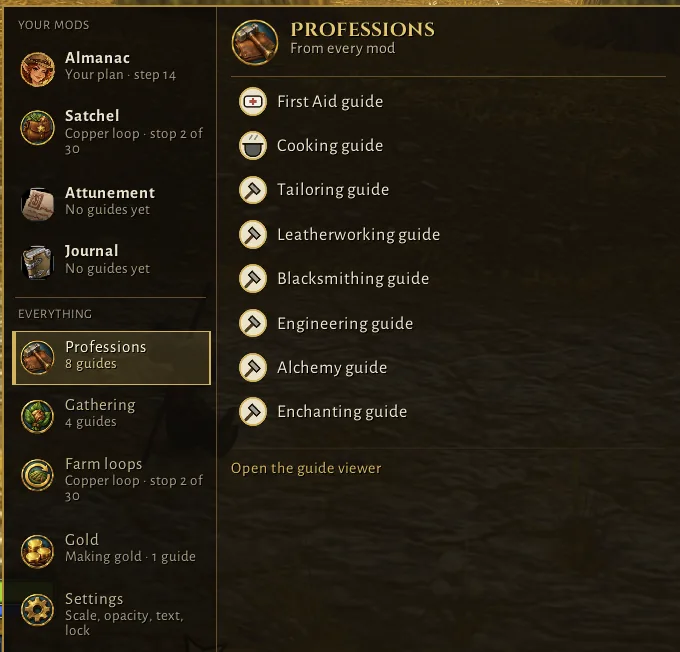
In the beta, the Jebbie's menu puts your mods and everything they offer in one place: the plan you are following with a Continue button, your leveling guides, Making gold, and tools to find the nearest inn, vendor, mailbox or bank, find a profession trainer, change quick settings, report a problem or switch to the classic view. Professions, gathering, farm loops, gold and settings from every mod sit in the same menu.
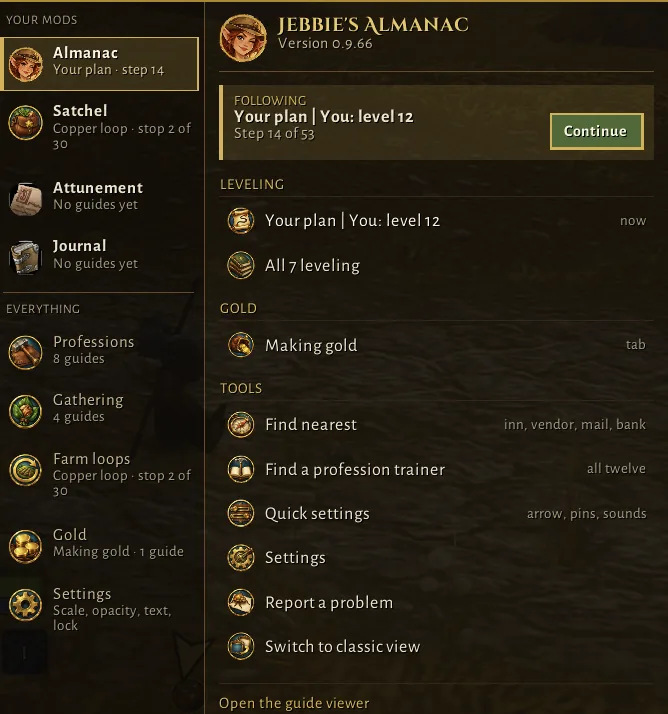
The Jebbie's menu, in the beta (0.9.66).
Better with Voices and Satchel
With Jebbie's Voices, she speaks your quest finishes, trainer visits and gear upgrades. With Jebbie's Satchel, your gathering pins sit on the same map. Each works on its own too.
Advice only
It never plays for you: no key presses, no movement, no auto accept or turn-in, and nothing happens in combat. It follows Blizzard's addon policy.
At a glance
Status, commands and bug reports
Status
Stable · 0.9.86On this site and in the Jebbie's Mods launcher, and on CurseForge and Wago Addons. Beta 0.9.89 is in the launcher with the Beta channel on.
Slash commands
/jebbieJebbie's Almanac (/almanac works too)/jebbie resyncRebuild your route from your quest log right now (beta)/jbugReport a problem
Found a bug?
Type /jbug in the game to report it; the launcher sends the report for you. No launcher? Use the bug form at jebbiesmods.com/bug.
Everything in it
Every feature
Leveling routes to 60
A step-by-step route for your class from where you stand, in level brackets (1-10, 11-20 and on), with quests, flights, the tram, ships and zeppelins, your hearthstone and trainer visits.
Riding at 40 and 60
At 40 and 60 a tip names your own race's riding trainer; in Forever the mount comes with the riding skill.
Quests new in Forever
Quests that Forever added since 2004 join the routes once someone has played them with the Almanac, marked "Learned from Forever", starting with four new Northshire quests. Quests Forever changed (the Kobold Candles are no longer in the mines) point where play found them.
Forever's new dungeons
Your route names Forever's nine new dungeons when you reach their levels, from Blizzard's own level table, for when you have a group.
Jebbie's brain (opt-in)
Turn it on and the companion runs Jebbie's decision model on your own computer to weigh skipping a step, when to train and your bug reports; every call is shown as advice with how sure she is.
The new guide window (beta)
One dark, see-through guide window with a tab for each guide you follow, shared by Jebbie's mods. It does what the classic window does, from checkboxes and Skip to Find nearest and quick settings, and its Window settings set the scale, opacity, text size, width and lock, starting from your classic window's. Its Guides flyout lists your Jebbie mods and shared areas beside the window. Try it from the Guides menu.
New spells at your trainer
When you level up, Jebbie lists the spells your trainer now teaches, what they cost against your gold, and the nearest trainer.
Hearthstone advice
When hearthing home beats the walk to your next step, the step says so and the step item button offers your Hearthstone to click.
Routes in level brackets
Leveling is split into 1-10, 11-20 and on up to 60. Guides lists each bracket with its zones, your route carries on into the next by itself, and your ticks come with you.
Horde routes to 60
Every Horde race and class, Shaman included, from Durotar, Tirisfal Glades and Mulgore to level 60, with the zeppelins and the Horde cities.
Steps that follow the game
Every step shows done, in progress or skipped from what the game reports, you can tick any step done yourself, and picking up a quest never jumps the guide.
How hard is it?
Every quest step in the game's own colours, too-hard quests wait until you are ready, and solo tips for your class.
Skipped list
See what you skipped and why, go back to any step, or stop the reminders.
Extra quests
Quests the route does not have get their own section, with where they fit on your way.
Guides menu
One button to switch between leveling routes, your professions and making gold, keeping your place in each.
Profession guides
All twelve professions from 1 to 300 at the cheapest path, with materials counted from your bags, where to train, and with Jebbie's Satchel the nearest herbs and veins ready to gather.
Making gold
What to vendor, auction or keep, from the Auction House prices you have seen yourself, never made up.
Waypoint and arrow
The game's own waypoint on each step, and an on-screen arrow with distance and time.
World map pins
The next few steps marked on your world map.
Gear upgrade tips
Spots upgrades in your bags from loot, trades and mail, and counts enchants.
Quest sounds
A little fanfare or Jebbie's own voice when a quest is done, and a tick for progress.
Jebbie's advice
With the companion app, Jebbie weighs in on which quests are worth it and where to start.
Start-zone recorder
Playing a race with no route yet, like the Skyborne? Jebbie records your start for a future route.
Find nearest
The nearest innkeeper, trainer, vendor, repair, mailbox, flight master or bank, one click away.
A viewer you can shape
Text size, font, width, opacity, lock and a minimap button.
Report a problem in game
A bug button sends Jebbie what went wrong and where, with your name only if you choose.
Works with Jebbie's Voices
With Jebbie's Voices installed, she speaks your quest finishes, ticked steps, trainer visits, gear upgrades and extra quests on your way.
Advice only
It never acts for you, never automates anything, and nothing is sent anywhere unless you run the companion.
Get it
Install Jebbie's Almanac
The launcher installs and updates it for you. Or install it by hand:
Jebbie's Almanac 0.9.86
8.3 MB · released 2026-10-13 · for WoW Forever (interface 16001)
Download JebbiesAlmanac-0.9.86.zipSHA-256701d67e26b31a5ccd058ce2a507852224adeb593d713f861a3c979220c3ca274
What's new in 0.9.86
Improved
- The Jebbie's menu is one short list: one row per addon plus the guide areas and Shared settings. Each row opens its tools in a side menu, so the menu stays short however many mods you install. Escape closes the side menu first, then the menu.
Testers: the Jebbie's Mods app has a switch, "Beta: get new builds early (may have bugs)". Beta builds are never listed on this page.
Download and unzip
Unzip
JebbiesAlmanac-0.9.86.zip. It holds the folder,JebbiesAlmanac.Put it in your AddOns folder
Move the
JebbiesAlmanacfolder intoWorld of Warcraft/_classic_beta_/Interface/AddOns. On a Mac that is usually/Applications/World of Warcraft/_classic_beta_/Interface/AddOns; on Windows,C:\Program Files (x86)\World of Warcraft\_classic_beta_\Interface\AddOns. Replace the old folder when you update.Start the game, then
/reloadfor updatesThe first time, restart the game: a new addon folder is only seen at startup. After an update,
/reloadis enough./jebbie toggleor the minimap button shows and hides the guide.Check the download, if you like
Mac:
shasum -a 256 JebbiesAlmanac-0.9.86.zip. Windows:certutil -hashfile JebbiesAlmanac-0.9.86.zip SHA256. It should match the SHA-256 above.Beta testers with the repo
Keep using the updater:
python3 tools/update.py, or double-clickupdate.commandon a Mac orupdate.baton Windows, then/reload. The optional companion app (Python 3.10 or newer) runs withpython3 -m jebbies_almanac.companionand openshttp://127.0.0.1:8765; it creates its own plan folder.Addon stores
Also on CurseForge and Wago Addons, whose apps update it for you.
In the game
Screenshots
Stop cards: where to go, who to talk to and what to do at each stop.
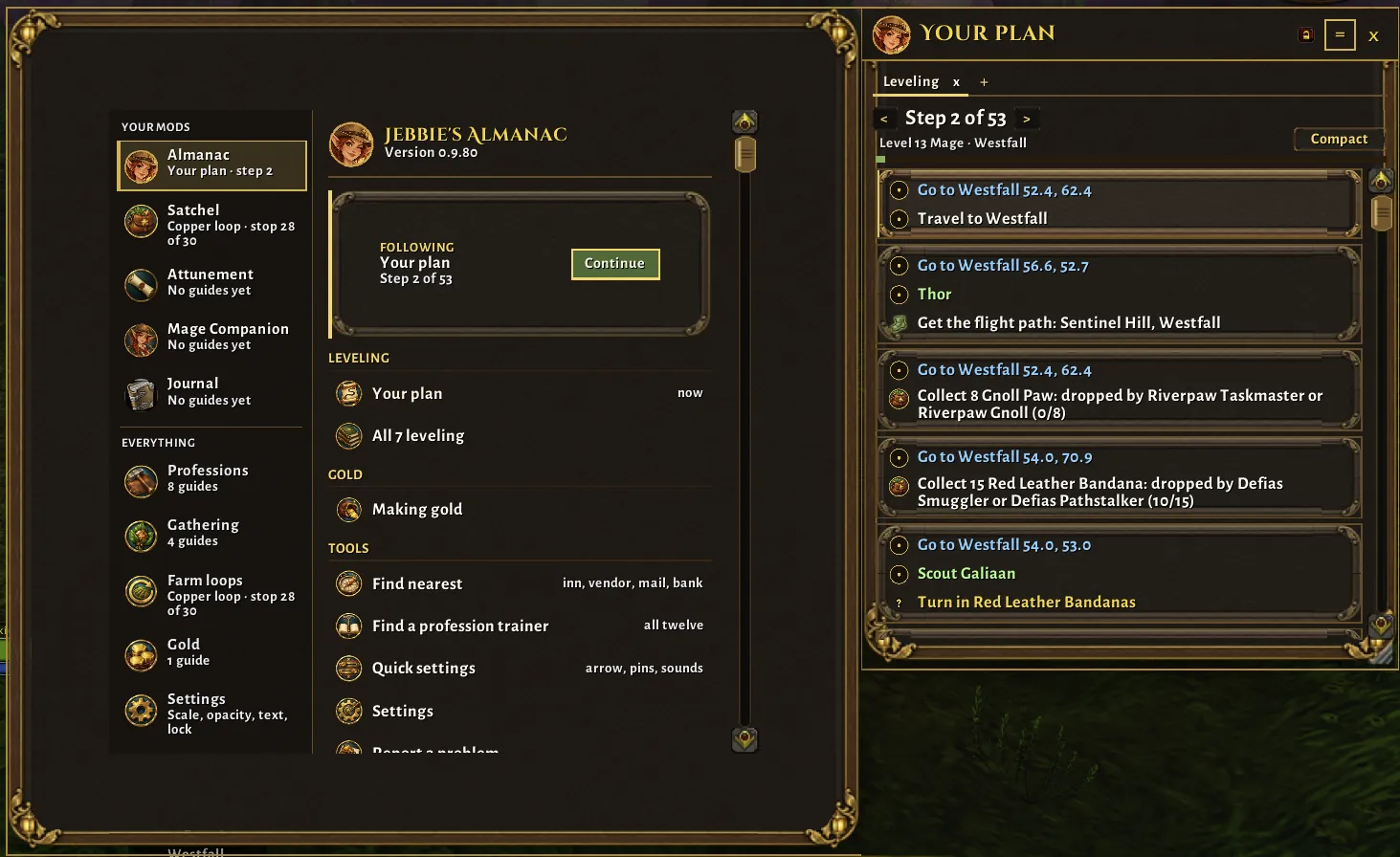
The Jebbie's menu and your plan, side by side, in the beta.
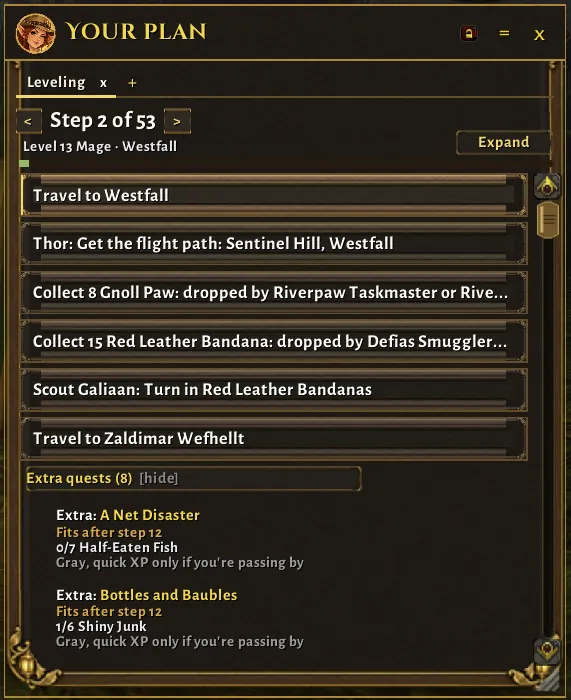
Compact view: one line per stop, with extra quests and where they fit.
The arrow, with the distance and what to do at the next stop.
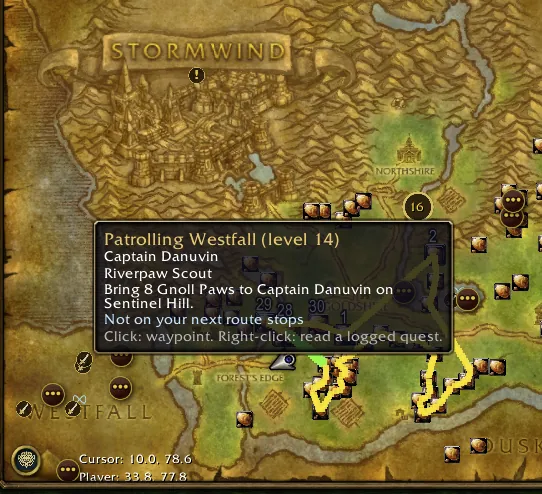
Route stops and quest areas on the world map.
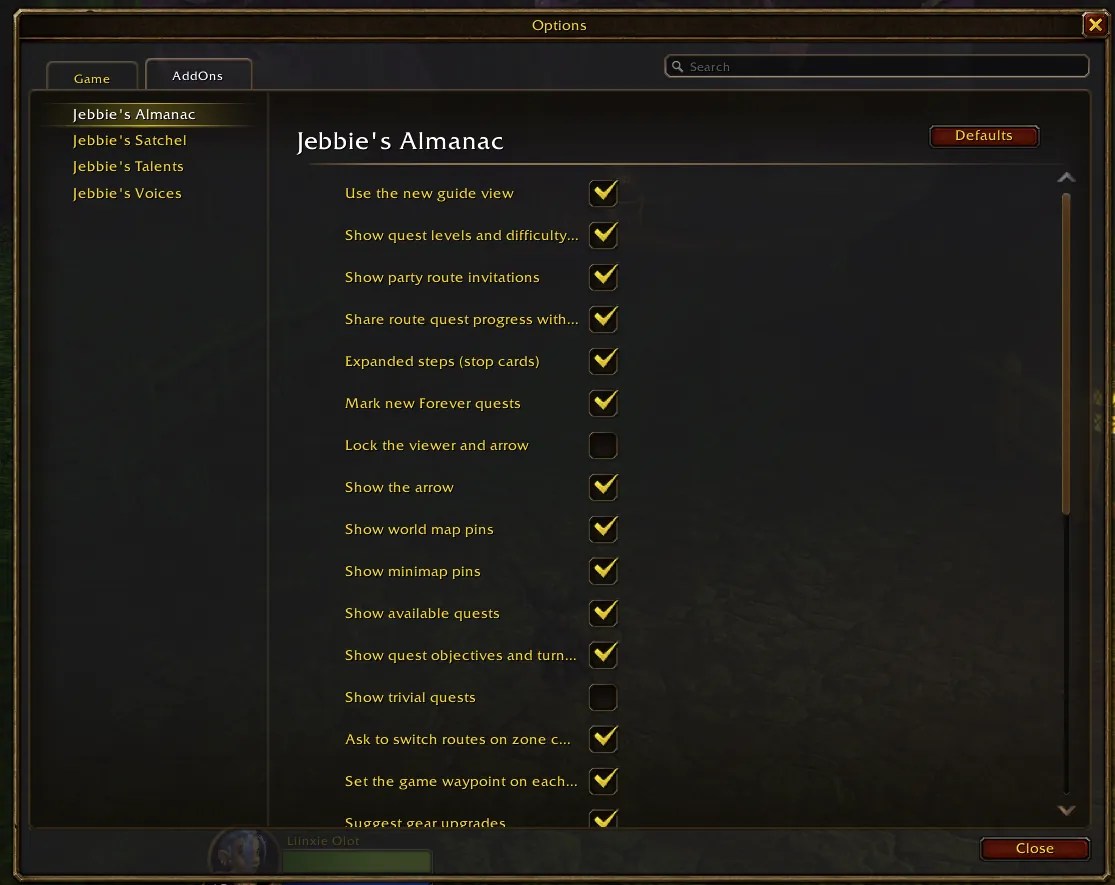
Almanac settings in the game's AddOns options.
Making gold, from your bags and the auction prices you have seen.
Profession guides in the Jebbie's menu.