
Chapter V
Jebbie's Talents
Beta · 0.0.17A talent planner built on WoW Forever's own talent trees. Plan your points without spending one, load one of Jebbie's ready builds, and see what to take next when you level up.
Get it in the Jebbie's Mods launcher (Beta channel on). Turn on Beta in the launcher's settings and it installs Jebbie's Talents and keeps it updated.
The launcher is coming soon for your system. Until then, install the addons by hand: it takes a minute.
how the beta works · what the launcher does
Every system
- Mac (Apple Silicon and Intel): JebbiesMods-0.1.23-universal.dmg (9.3 MB, signed and notarized)
- Windows: JebbiesMods-0.1.23-x64-setup.exe (2.3 MB)
- Linux: launcher coming soon; install by hand
What it does
What Jebbie's Talents does
Plan on Forever's trees
All three trees for your class, with ranks, prerequisites and row unlocks. Plan at any level without spending a point.
54 ready builds
Jebbie's picks: two for every talent tree of every class, one for solo leveling and one for a dungeon role, each with a short line on what it is good at. One click loads it into the planner.
Trainer card
When you level up or visit your class trainer, a small card shows which talent to take next from your plan, with a button that opens the planner there. Turn it off in the settings.
Ctrl preview
Hold Ctrl over a talent to see its next rank and what it unlocks, or over a build to see its whole point path.
At a glance
Status, commands and bug reports
Status
Beta · 0.0.17Get it in the Jebbie's Mods launcher (Beta channel on). While it is in beta there is no download on this site.
Slash commands
/talentsOpen the talent planner/jbugReport a problem
Found a bug?
Type /jbug in the game to report it; the launcher sends the report for you. No launcher? Use the bug form at jebbiesmods.com/bug.
Talent data from talentsforever.com, CC BY 4.0, adapted by Jebbie's Talents.
Get it
Install Jebbie's Talents
Get it in the Jebbie's Mods launcher (Beta channel on)
Jebbie's Talents is still in beta, so there is no download on this page yet. Turn on Beta in the launcher and it installs Jebbie's Talents and keeps it updated.
What's new in 0.0.17
Improved
- The Jebbie's menu is one short list: one row per addon plus the guide areas and Shared settings, each opening its tools in a side menu, so the menu stays short however many mods you install.
In the game
Screenshots
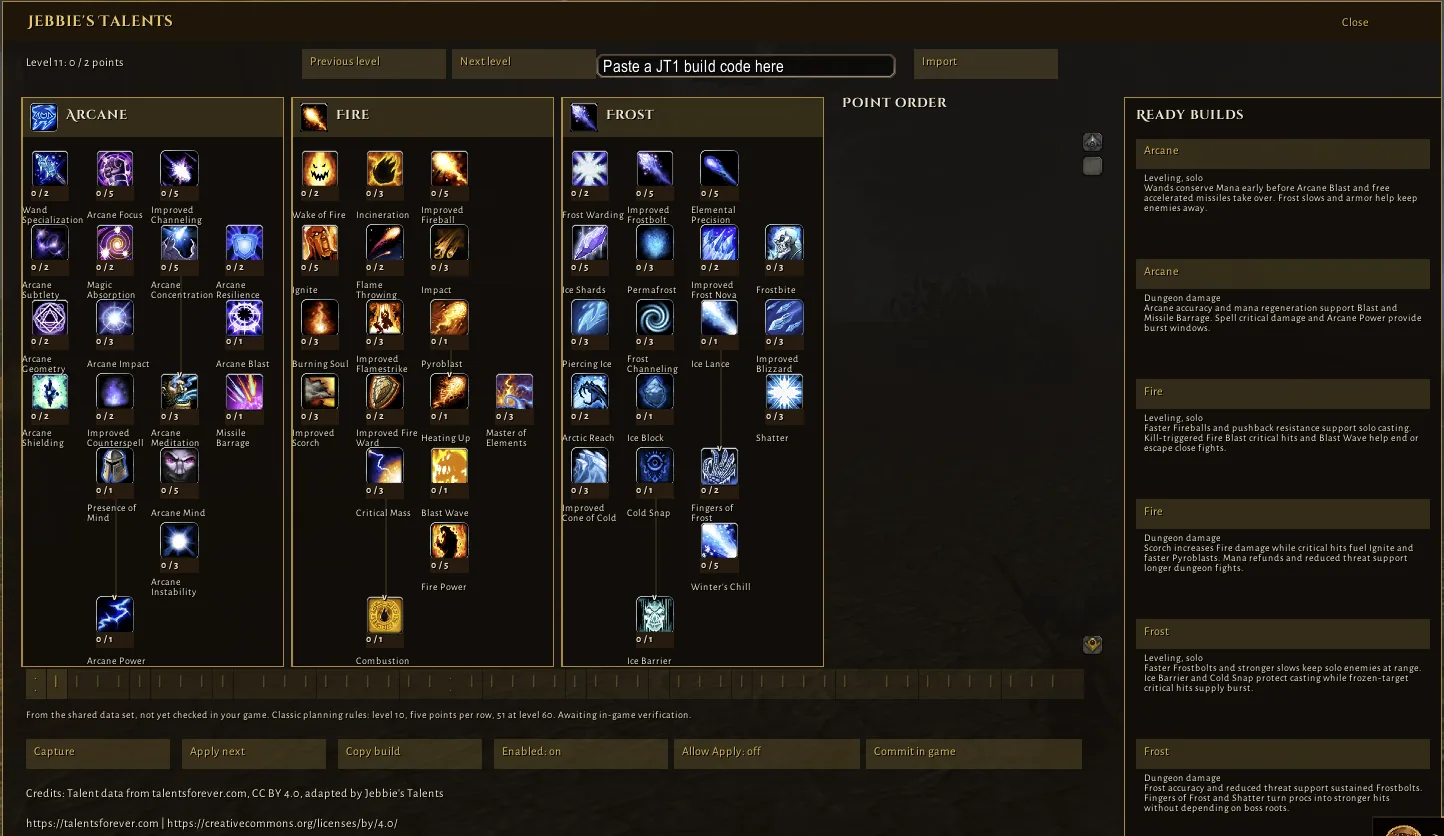
The planner with the Ready builds column, in the beta.